

TL;DR
- Conversations now support Contact IDs (generation, search, filtering) for faster thread retrieval
- More accurate conversation views with platform-specific fetching and refined filters
- New controls to disable/enable contacts as conversation sources
- Smoother infinite scroll with better pagination and a clearer “has more” state
- Messages now support an assets field (foundation for attachments/uploads)
- Instagram UX improvements + Instagram and Zapier enabled in the UI (with updated plan/config handling)
- Login improvements: sign out + better redirects, plus UI cleanup and clearer messaging
What’s new
1) Conversations are easier to find and manage (Contact IDs + better filters)
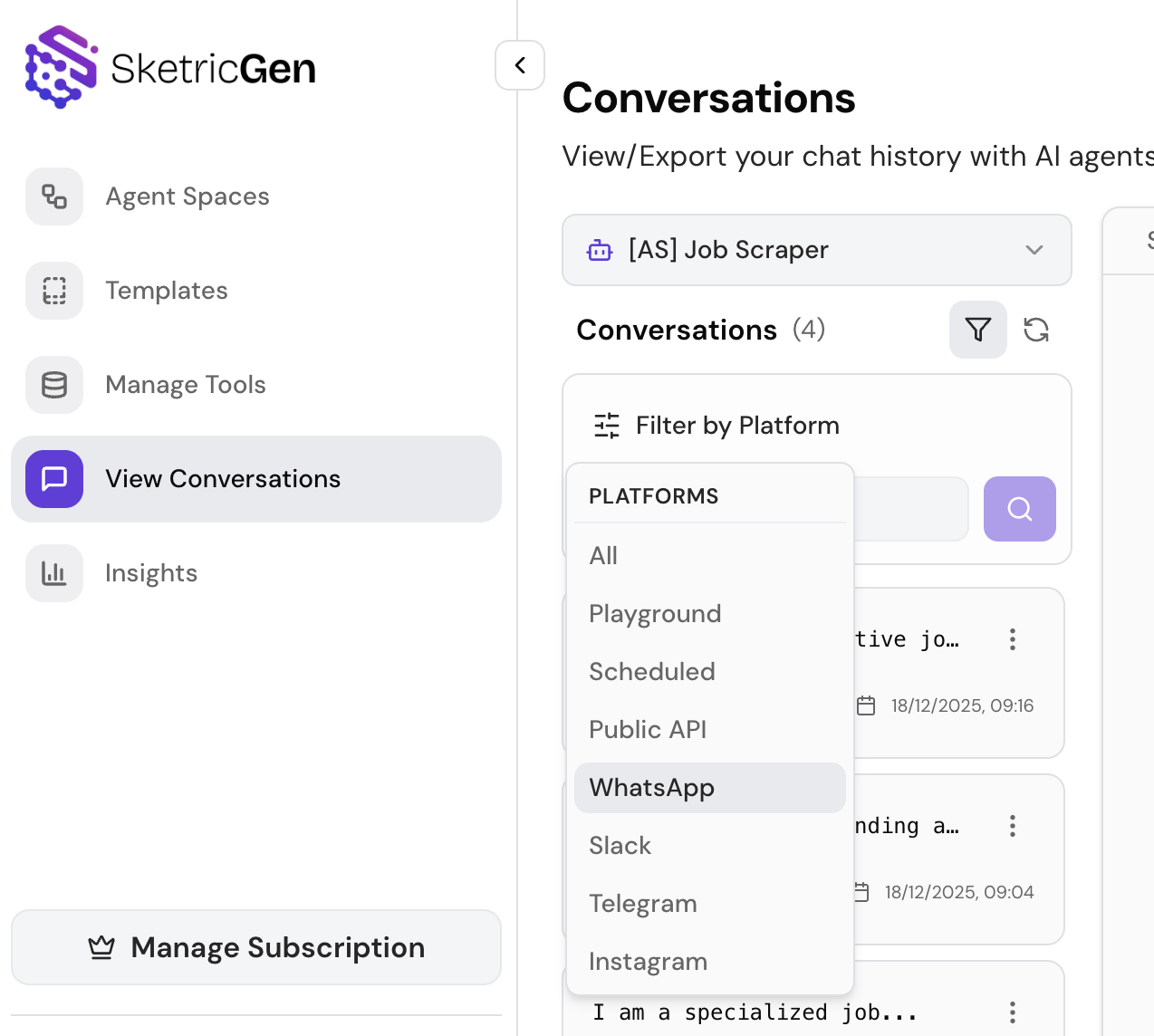
Conversations now include Contact IDs to make identifying and retrieving threads faster:- Contact ID generation
- Search and filtering by Contact ID
- Platform-specific fetching for more accurate views
- Improved agent-based fetching and general cleanup on the Conversations page
2) Smoother scrolling and pagination (less jank, more speed)
We improved pagination behavior with updated limits and a clearer “has more conversations” handling to make infinite scrolling more reliable. Why it matters: easier triage and monitoring when you have lots of threads—especially on mobile.3) Richer messages (attachments foundation)
We updated the message schema to include an assets field, and standardized how Contact IDs propagate across supported messaging platforms. Why it matters: this is the groundwork for richer message types (attachments/uploads) across channels and more consistent cross-platform behavior.4) Public asset uploads (in development — not fully released yet)
We started building a public asset upload system (still in development, not fully enabled for end users yet), including:- A dedicated public assets model with authorization rules
- A new upload service for more reliable file handling and error management
- Platform improvements to support agent-based asset retrieval
Note: We’ll announce this as a user-facing feature when the UI and full workflow are ready.
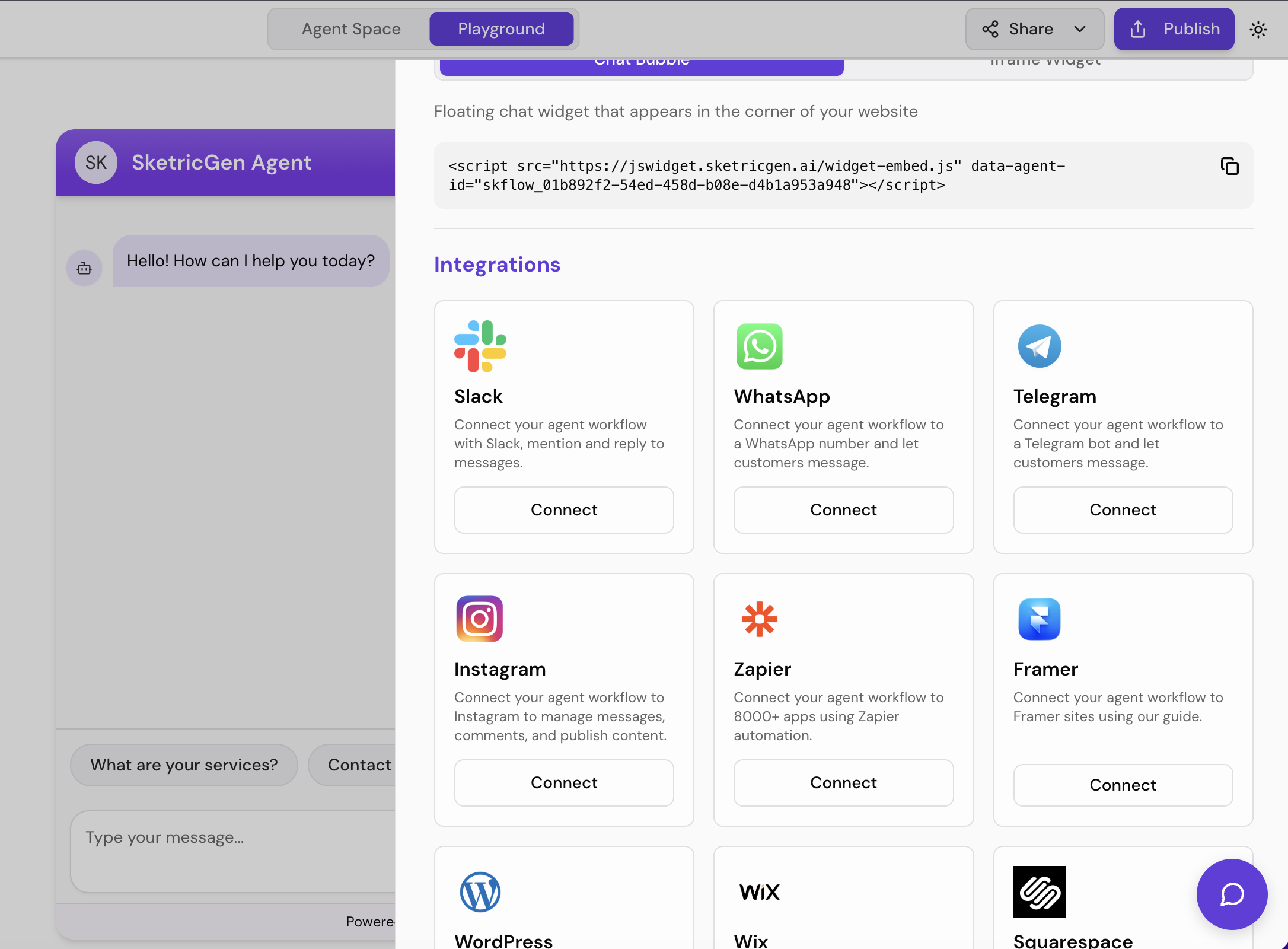
5) Integration updates (Instagram UX + Zapier enabled)
- Improved Instagram integration UX with clearer feedback (e.g., notifications during actions)
- Added platform support needed for human takeover logic in multi-channel agents
- Enabled Instagram and Zapier in the UI with updated plan limits and configuration handling
6) Authentication & UI improvements (small changes, big friction reduction)
- Added sign-out support
- Improved login redirects
- Clarified messaging for FileSearch badge
- General UI cleanup and consistency improvements
Who this release is for
- Teams managing lots of customer conversations and needing faster search + better filters
- Multi-channel agent setups where consistency across platforms matters
- Anyone preparing to use richer message types (attachments/uploads)
- Builders connecting Instagram or Zapier and wanting a smoother setup experience
How to use (quick steps)
Find a conversation faster with Contact IDs
- Open Conversations
- Use search/filter to query by Contact ID
- Apply platform filters for more accurate views
- Disable a contact source if it’s noisy or irrelevant
Enable Instagram or Zapier
- Go to Integrations
- Select Instagram or Zapier
- Follow the connect flow and confirm the connection status
- Run a test message/workflow to verify end-to-end behavior
Prepare for attachments (assets field)
- If your workflows depend on file/asset content, keep an eye on upcoming “public asset uploads”
- For now, rely on your current asset/document handling flows
- When released, you’ll be able to attach/upload more seamlessly across channels
FAQ
What is a Contact ID in SketricGen Conversations?A stable identifier that helps you search, filter, and retrieve conversation threads more reliably—especially across multiple platforms. Can I disable a contact from showing up in Conversations?
Yes—you can disable/enable contacts as conversation sources to reduce noise. Are attachments supported now?
This release adds the schema foundation (“assets” field). User-facing attachment workflows will expand as the public asset upload system is completed and enabled. Is the public asset upload feature available today?
Not fully—it’s in development. The platform foundation is in place, and we’ll announce it when the UI and full workflow are ready. Are Instagram and Zapier available in the UI now?
Yes—both are enabled in the UI, with improved configuration handling and updated plan limits. What is “human takeover” support?
A capability needed for multi-channel agents to hand off a conversation to a human operator when appropriate (more improvements coming).
Get Started
- Try SketricGen: https://www.sketricgen.ai/
- Browse Templates: https://www.sketricgen.ai/template
- Docs: Conversations & Insights: /user-guides/conversations-and-insights
- Docs: Instagram Integration: /deploy/instagram
- Docs: Zapier Integration: /deploy/zapier