

TL;DR
- Embed chat anywhere with iframe support and fullscreen mode
- New Forced Handoff for more predictable control in multi-agent workflows
- Improved FlowEditor + NodeInspector for clearer configuration and validation
- Cleaner UI consistency across chat/templates/integrations (loading states, spacing, interaction feedback)
- Integration reliability updates for docs links and connector environment variable fixes for Next.js builds
- Under-the-hood refactors for better performance, stability, and error handling
What’s new
1) Embed chat anywhere (iframe + fullscreen)
You can now embed SketricGen chat more flexibly:- Iframe widget support for easy drop-in embedding
- Fullscreen mode for a cleaner end-user experience
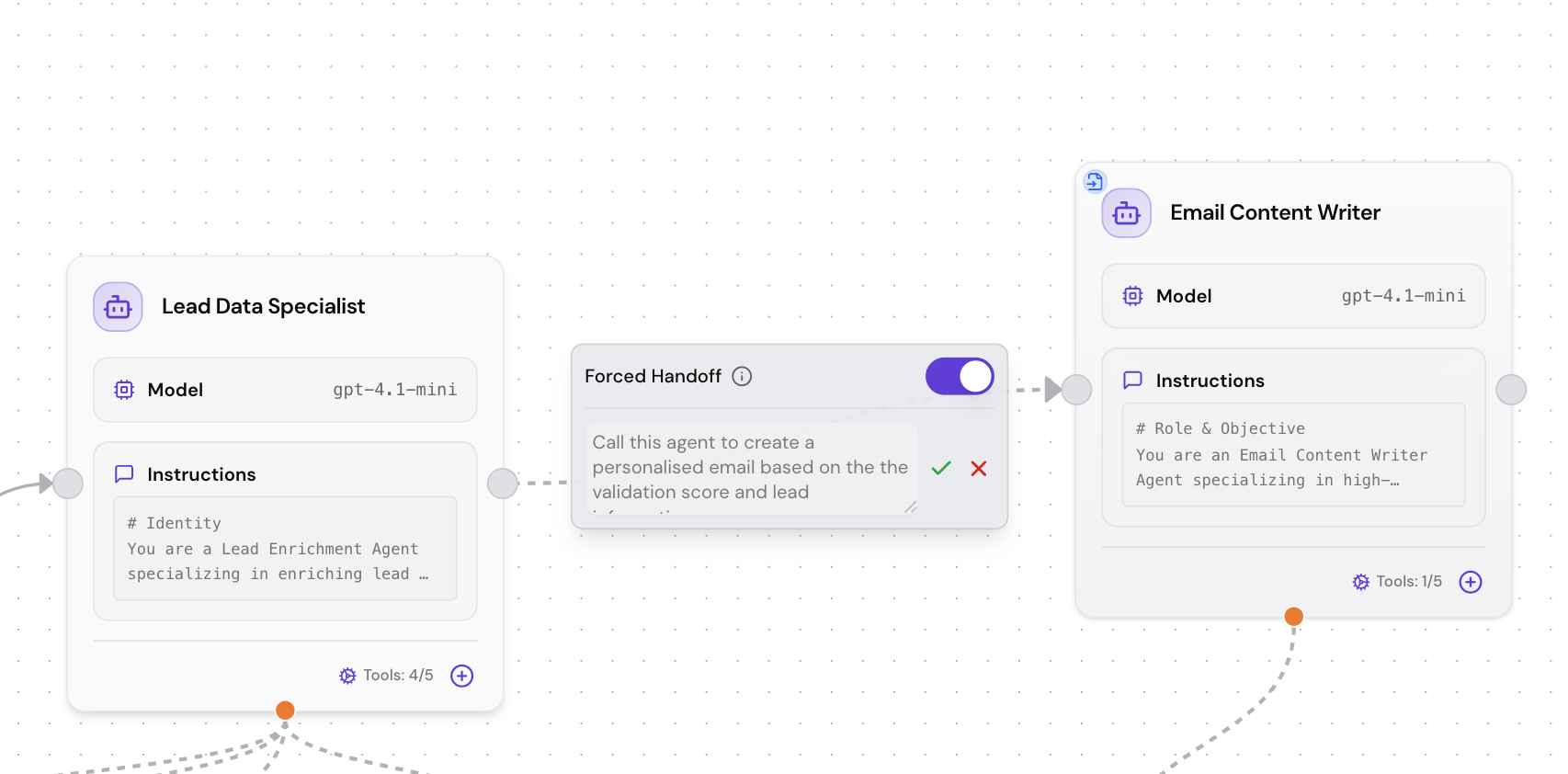
2) More predictable multi-agent control (Forced Handoff)
We introduced Forced Handoff to help you control agent flow in workflows:- Enforce when a workflow must transfer responsibility to the next step/agent
- Reduce unexpected branching or “agent drift” in complex automations
3) FlowEditor + NodeInspector upgrades (clearer configuration)
We refined the workflow-building experience:- Clearer configuration and validation behavior
- Improved state handling and smoother interactions while editing
Screenshot/GIF placeholder: “NodeInspector validation + improved editor UX”
4) UI consistency improvements (less friction across the app)
We unified styling and layout across key areas:- Chat (messages + lists)
- Templates page
- Integrations section
- Dialogs/modals (loading states, spacing, interaction feedback)
5) Integrations updates (docs + reliability)
- Updated and standardized integration documentation links
- Fixed connector environment variable configuration for Next.js builds
6) Reliability + performance improvements (internal upgrades that help users)
We shipped internal refactors across middleware, API routes, layout metadata, and build tooling, plus cleanup of redundant configs. Why it matters for users: fewer edge-case errors, faster UI interactions, and more stable deployments—especially as workflows get larger.Who this release is for
- Teams embedding agents into websites, apps, and internal tools
- Builders running multi-agent workflows that need stronger control
- Developers deploying SketricGen-connected experiences with Next.js and connector triggers
- Anyone who wants a cleaner, faster builder experience
How to use (quick steps)
Embed chat with an iframe
- Open your agent’s deploy/share settings
- Choose Iframe Widget
- Copy the embed snippet into your site/app
- Enable Fullscreen if you want a more focused experience for users
Use Forced Handoff in a workflow
- Open your workflow in the FlowEditor
- Configure your agent transition/handoff step
- Enable Forced Handoff
- Validate in NodeInspector and run a test message
Confirm integrations stay connected
- Open your workflow and check node connection status
- If a tool disconnects, use the updated prompts/notifications to reconnect quickly
- Re-run a test to confirm the workflow executes cleanly
FAQ
Can I embed SketricGen chat in an iframe? Yes—this release adds iframe widget support designed for simple embedding. Does fullscreen mode work for embedded chat? Yes—fullscreen is supported to improve the embedded chat experience, especially for onboarding and support flows. What is “Forced Handoff” in a workflow? A control mechanism that enforces when a workflow must hand off responsibility, making multi-agent behavior more predictable. I’m using Next.js with connector triggers - what changed? Environment variable configuration issues were fixed to improve reliability in Next.js builds. What changed in the builder experience? FlowEditor and NodeInspector were improved for clearer configuration, better validation behavior, and smoother editing.Get Started
- Try SketricGen: https://www.sketricgen.ai/
- Browse Templates: https://www.sketricgen.ai/template
- Docs: Embedding & Widgets: /deploy/custom-website
- Docs: Orchestration and Structured Data: /user-guides/orchestration-and-handoffs
- Docs: Tools & Integrations: /user-guides/tools