

TL;DR
- Collaborative Agent Space: See every top-level agent in a project, understand its status, and spot teammates working with it.
- Shared live conversations: Join a teammate’s active Playground conversation and collaborate with the same agent in real time.
- Focused Agent Build: Open one agent’s internal workflow, edit its nodes, and move directly into testing.
- Structured Output and Human Input: Define predictable response data and let an agent pause for a person’s decision when needed.
- Adaptive onboarding: Share your website, role, and goals to receive personalized agent recommendations and start a Brand Agent.
- More transparent credits: Annual plan credits release monthly, eligible users can claim a daily allowance, and add-on purchases have clearer confirmation.
- Improved history and privacy: Conversation visibility, pagination, private conversations, and retention are handled more consistently.
- Richer Teamspaces: Switch projects more reliably, add project icons and profile photos, and see when an app connection is shared with a project.
What’s new
1) Operate your AI workforce from Agent Space
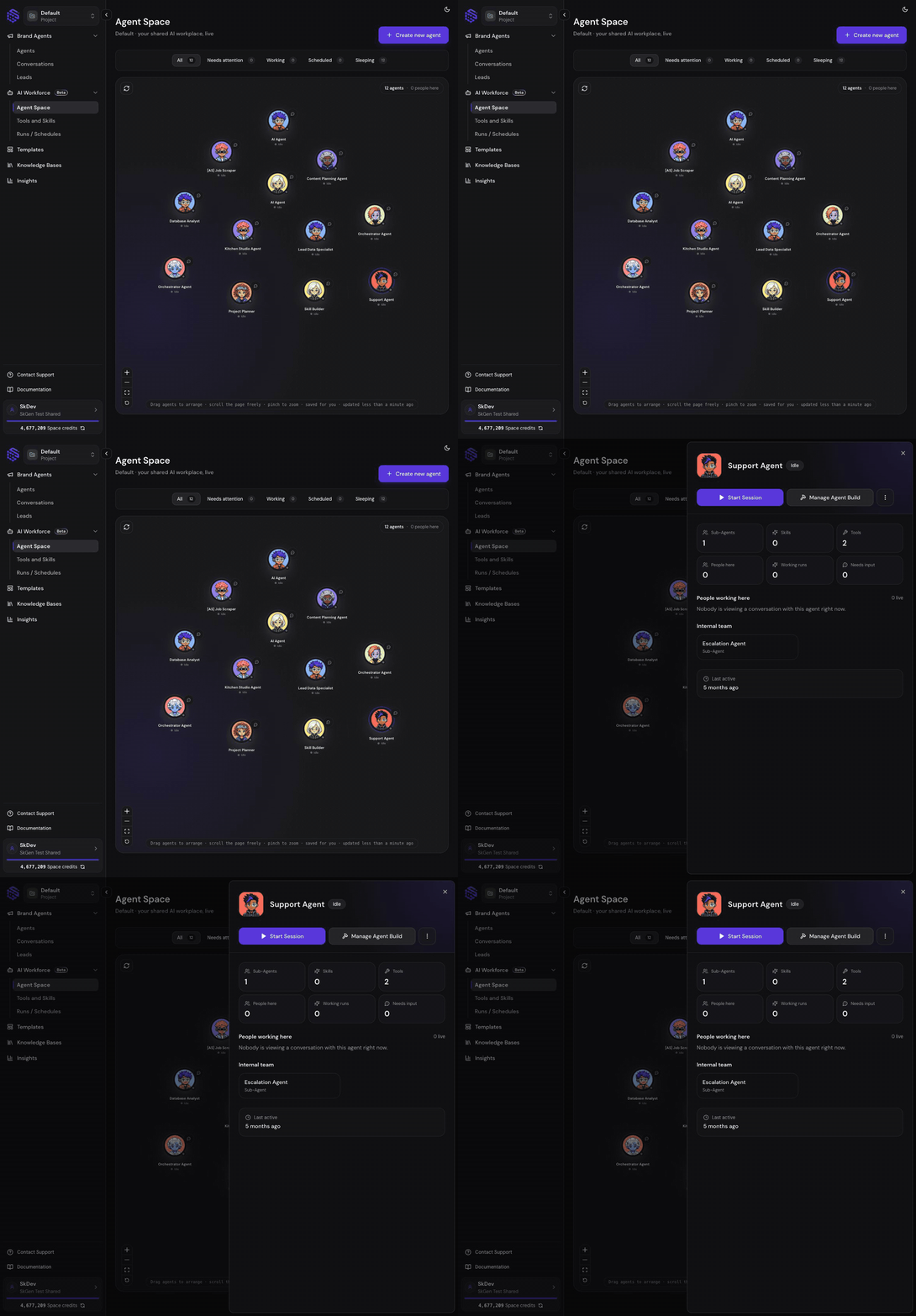
Agent Space is the project-level canvas for seeing what your agents and teammates are doing:- One project view: See every top-level agent in the active project without opening each workflow.
- Operational filters: Group agents by Needs attention, Working, Scheduled, or Sleeping, with a count for each state.
- Agent details: Select an agent to inspect its role and start a quick conversation from the canvas.
- Draggable layout: Arrange agent avatars in a layout that makes sense to you.
- Personal canvas memory: Positions and zoom are remembered for each browser, member, and project. Moving an agent does not rearrange another teammate’s canvas.
- Accessible navigation: Use visible zoom controls or pinch gestures, and rely on reduced-motion behavior when enabled in your device preferences.
2) Collaborate with teammates in live agent conversations
Agent Space shows live human presence around the agents your team is using:- Live teammate presence: A teammate appears beside an agent while they have that agent’s shared Playground open.
- Join the same conversation: Select the teammate presence indicator to enter the conversation they are using.
- Shared streaming response: Participants in the shared conversation see the agent’s response progress without waiting for separate sessions to refresh.
- Inline quick chat: Start and stop an agent response directly from Agent Space when you need a fast interaction.
- Membership-aware access: Presence and conversations are limited to people who can access the project and agent.
- No artificial activity: Merely viewing Agent Space does not make you appear as actively chatting with an agent.
3) Understand and edit one agent in Agent Build
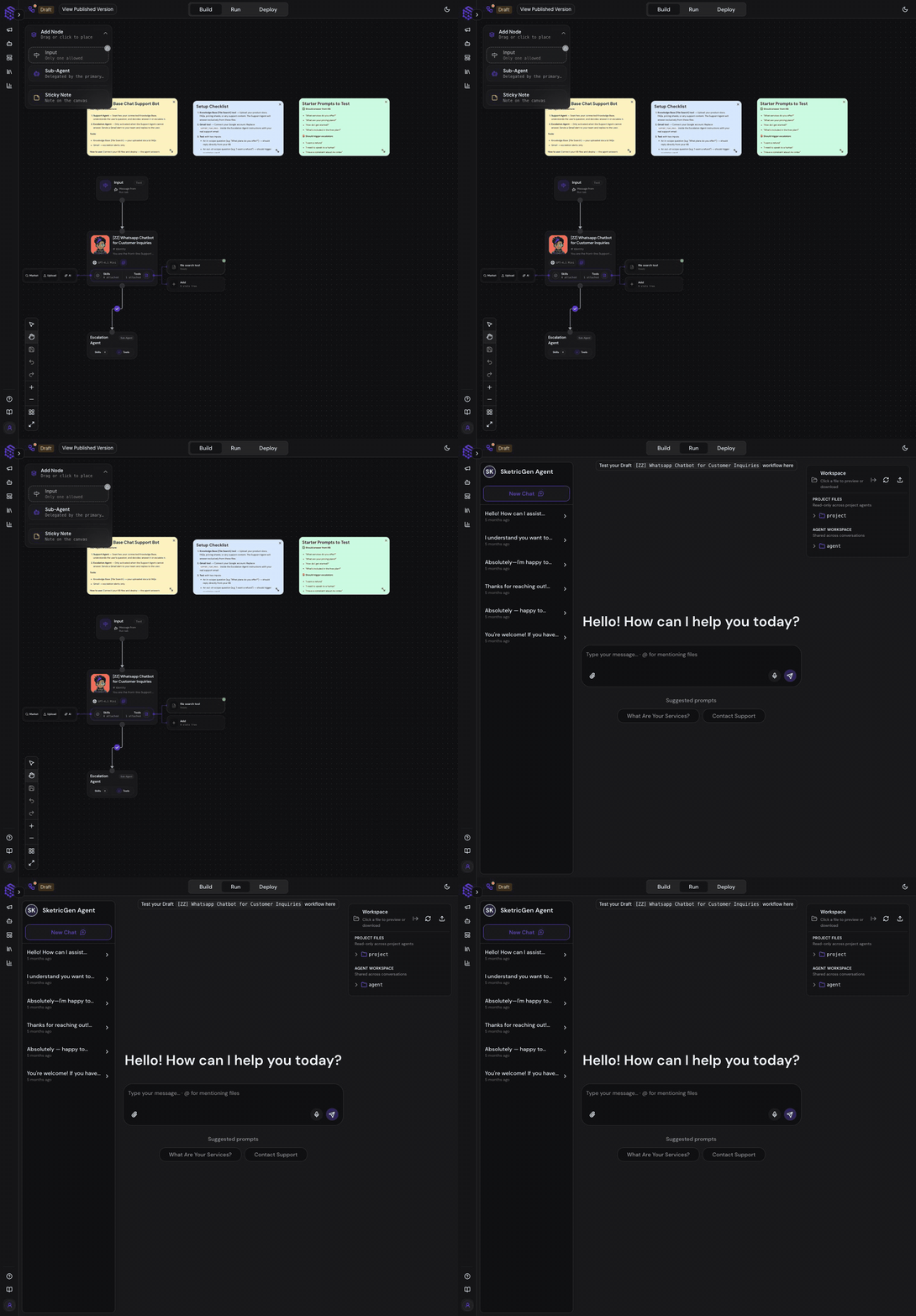
Agent Build is the per-agent canvas that exposes how the selected agent works:- Clear product boundary: Agent Space manages the workforce; Agent Build manages one agent’s internal workflow.
- Node-level editing: Inspect agents, tools, skills, knowledge sources, and other workflow steps from the canvas.
- Unsaved-change protection: If you leave a node with draft edits, SketricGen asks before discarding them.
- Contained configuration panels: Long node settings remain inside the inspector instead of overflowing the editing area.
- Validation before use: Skill and tool limits are checked before the workflow is accepted.
- Direct testing path: Move from Agent Build into the Playground to test the current agent behavior.
4) Add Structured Output and Human Input
Agent workflows can now handle two important production patterns more explicitly:- Structured Output: Define the fields and data shape an agent should return when another system needs predictable output.
- Schema-based validation: Structured Output uses a versioned JSON Schema contract so downstream tools and AI clients can understand the expected result.
- Human-in-the-Loop: Let an agent pause and ask a person for input before continuing a sensitive or ambiguous step.
- Skippable questions: Builders can configure Human Input so a user may skip the question when it is optional.
- Reliable resume behavior: Answered or outdated questions do not reappear when a paused conversation resumes.
- Turn protection: The composer remains unavailable while a run is still active, preventing a second message from conflicting with the current operation.
5) Start with adaptive, agent-driven onboarding
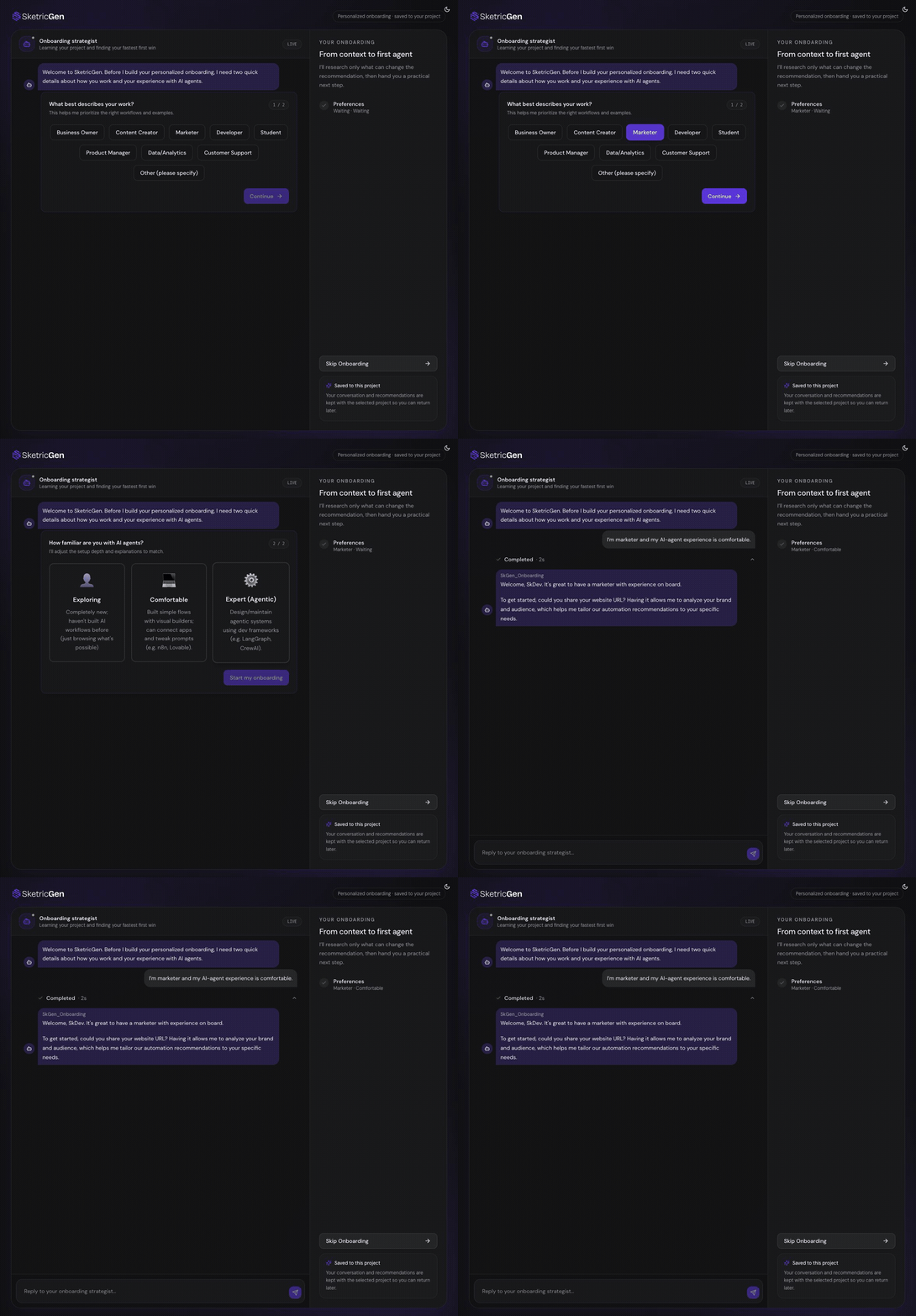
The new onboarding experience adapts its recommendations to the person and business setting up SketricGen:- Website context: Enter a website with or without
https://so SketricGen can understand the business and begin collecting relevant knowledge. - Role and goal discovery: Tell the onboarding agent what you do and which outcomes matter most.
- Personalized recommendations: Receive marketing, growth, and other agent suggestions based on your website and stated needs.
- Brand Agent creation: Review the Brand Agent decision inside the onboarding conversation while its setup starts in parallel.
- Progress persistence: Resume onboarding without replaying steps you already completed.
- Safe navigation: Website knowledge collection can continue across onboarding page transitions.
- Optional skip: Skip onboarding when you already know how you want to build.
6) Clearer credits, allowances, and add-ons
Credit behavior is now easier to connect to the plan and purchases that provide it:- Monthly release for annual plans: Annual subscriptions receive one month’s plan credits at a time on an automatic schedule instead of receiving the entire annual amount at once.
- Daily allowance: When an eligible signed-in user’s balance is too low to start a turn, they can claim a top-up once per rolling 24-hour period.
- No automatic resend: Claiming the allowance does not silently submit the failed message again; you decide when to retry it.
- Public widget stability: The daily allowance does not change how public widget visitors consume credits.
- Knowledge pack management: Add, change, or remove knowledge pack quantities from an active subscription.
- Purchase confirmation: Add-on and seat purchases show a confirmation step and clearer checkout progress.
- Current pricing: Pricing data is refreshed from the billing system instead of depending on stale cached values.
7) More consistent conversations, Teamspaces, and integrations
Several platform improvements make shared work and connected systems easier to reason about:- Conversation retention: The history available to a Teamspace follows the retention included with its current plan.
- Private conversations: Conversation visibility respects private-conversation rules in addition to project membership.
- Reliable long histories: Cursor-based pagination loads additional messages without depending on unstable page positions.
- Project switching: SketricGen reconciles the selected project when membership or subscription context changes.
- Project and profile images: Upload a project icon and a personal profile picture to make shared spaces easier to recognize.
- Connection disclosure: Before connecting an app, SketricGen explains that the connection is shared with the active project.
- Schedule safety: Active schedule limits are enforced and unsafe trigger replacements fail visibly instead of silently replacing a working schedule.
- Shopify and Wix reliability: Shopify product cards use the live Storefront catalog, while Wix connection requests can recover their required server secret correctly.
Who this release is for
- New SketricGen users who want recommendations without learning agent architecture first.
- Team leads and operators who need a live view of agents and human activity across a project.
- Collaborative teams that want to share an agent conversation instead of duplicating work in separate chats.
- Agent builders configuring workflows, Structured Output, and Human Input.
- Annual subscribers and add-on buyers who need transparent credit and billing behavior.
- Teams with sensitive conversations that rely on privacy and plan-based history retention.
- Shopify and Wix users running agents on connected websites.
How to use (quick steps)
Review and collaborate from Agent Space
- Open Agent Space and choose the correct Teamspace project.
- Use the status filters to find agents that are working, scheduled, sleeping, or need attention.
- Select an agent to open its details or start a quick conversation.
- If a teammate appears beside the agent, select their presence indicator to join the shared conversation.
- Open Agent Build when you need to change the agent rather than chat with it.
Add a Structured Output or Human Input step
- Open the agent in Agent Build.
- Add or select the relevant Structured Output or Human Input node.
- Define the expected fields, or write the question a person should answer.
- Decide whether the Human Input question may be skipped.
- Save the workflow, then test both the normal and paused paths in the Playground.
Complete adaptive onboarding
- Enter your website on the SketricGen welcome screen.
- Tell the onboarding agent about your role and desired outcome.
- Review the recommended marketing, growth, or other specialist agents.
- Confirm the Brand Agent path when it fits your use case.
- Continue into Agent Space and test the created agents with a real task.
Claim and use the daily allowance
- Submit a Playground turn as an eligible signed-in user.
- If the run cannot start because the balance is below the required threshold, review the allowance notice.
- Claim the available daily top-up.
- Resubmit the message when you are ready; SketricGen does not resend it automatically.
- If no allowance is available, review plan or add-on options from the pricing experience.
FAQ
What is the difference between Agent Space and Agent Build? Agent Space is the shared project view of your workforce: agents, statuses, teammates, and quick conversations. Agent Build is the internal canvas for one agent: its instructions, nodes, tools, skills, knowledge, and execution structure. Can two people chat with the same agent at the same time? Yes. A teammate with the shared Playground open appears around that agent in Agent Space, and another authorized project member can join the same conversation and see the streamed response. Does moving an agent on my Agent Space canvas move it for everyone? No. Canvas position and viewport are stored for the current member, project, and browser. This lets each teammate arrange the workforce without changing another person’s layout. Does Structured Output guarantee that every agent response is JSON? Structured Output defines the expected machine-readable result for the workflow step where you use it. Test the complete workflow and handle validation errors in the receiving system before relying on the output in production. How does the daily allowance work? An eligible signed-in user can claim it after a turn is rejected for insufficient starting credits, at most once per rolling 24 hours. It does not automatically resend the rejected message and does not change public-widget behavior. Are app connections private to the person who creates them? Project connections are shared with the active project. The connection flow now states this explicitly so you can confirm the correct project before authorizing the app. What happened to MAX? The separate MAX dashboard experience was removed. Agent Space, Agent Build, adaptive onboarding, and the Playground now provide the primary paths for discovering, operating, improving, and testing agents.Get Started
- Try SketricGen: https://www.sketricgen.ai/
- Agent Space: /ai-workforce/agent-space
- Agent Build: /ai-workforce/agent-build
- Team collaboration: /ai-workforce/team-collaboration
- Adaptive onboarding: /getting-started/adaptive-onboarding
- Structured Output: /dev-guide/structured-output-tools
- Agent Playground: /ai-workforce/playground