> ## Documentation Index
> Fetch the complete documentation index at: https://docs.sketricgen.ai/llms.txt
> Use this file to discover all available pages before exploring further.
# Better Conversations, Attachments, and New Integrations (Nov 26, 2025)
> SketricGen update: faster conversation search with Contact IDs, smoother infinite scrolling, richer messages with attachments, improved Instagram UX, Zapier + Instagram enabled in the UI, and login/UX upgrades.
This release improves the day-to-day experience for teams running multi-channel agents: **finding the right conversation**, **handling richer messages**, and **managing integrations** with less friction—plus some important platform upgrades behind the scenes.
## TL;DR
* Conversations now support **Contact IDs** (generation, search, filtering) for faster thread retrieval
* More accurate conversation views with **platform-specific fetching** and refined filters
* New controls to **disable/enable contacts** as conversation sources
* Smoother infinite scroll with better pagination and a clearer “has more” state
* Messages now support an **assets field** (foundation for attachments/uploads)
* Instagram UX improvements + **Instagram and Zapier enabled in the UI** (with updated plan/config handling)
* Login improvements: **sign out** + better redirects, plus UI cleanup and clearer messaging
***
## What’s new
### 1) Conversations are easier to find and manage (Contact IDs + better filters)
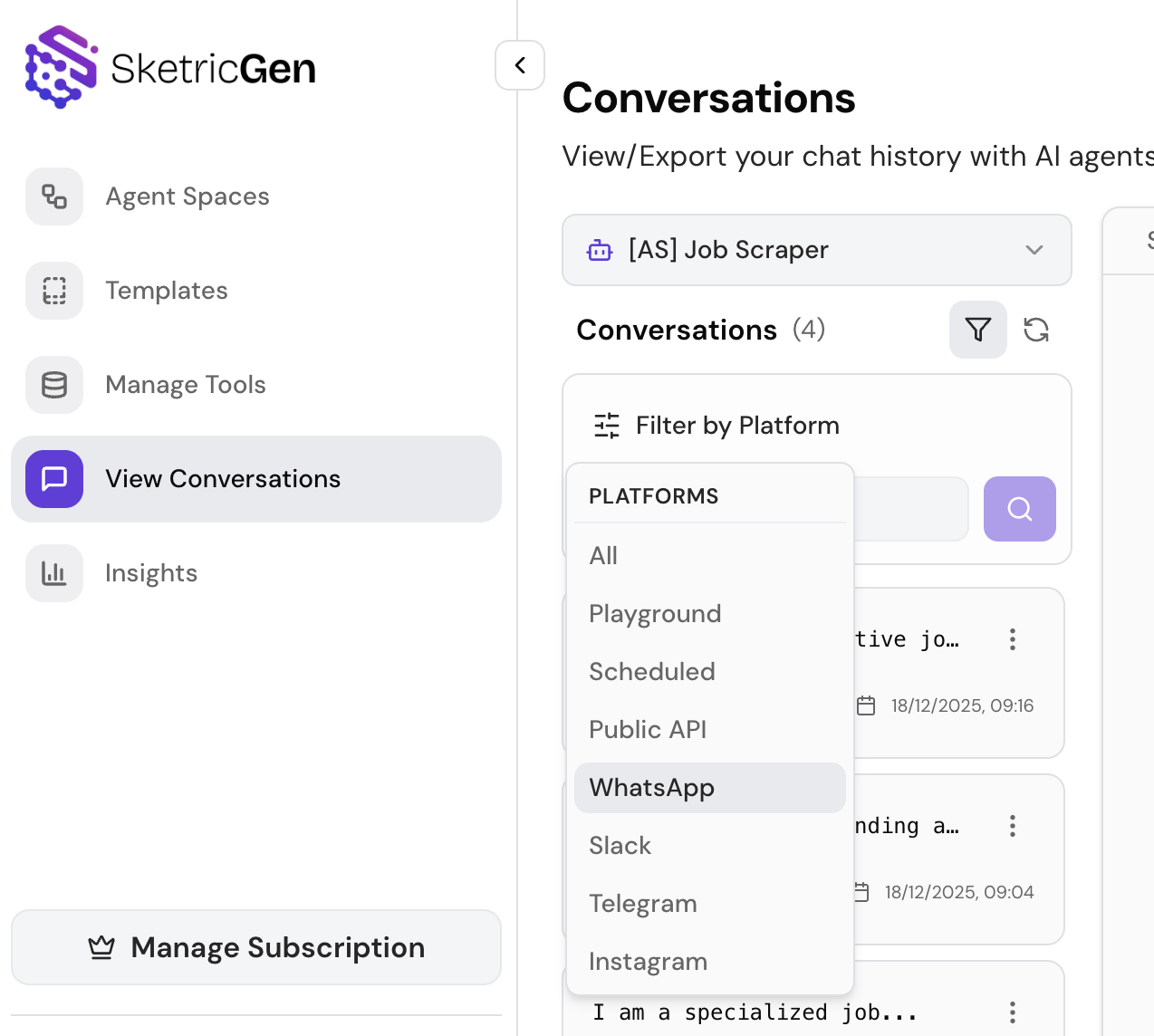
Conversations now include **Contact IDs** to make identifying and retrieving threads faster:
* Contact ID generation
* Search and filtering by Contact ID
* Platform-specific fetching for more accurate views
* Improved agent-based fetching and general cleanup on the Conversations page
You can also **disable/enable contacts** as conversation sources for better control over what shows up.
**Why it matters:** less time hunting for the right thread, fewer “wrong platform” views, and more control over noisy conversation sources.
 ***
### 2) Smoother scrolling and pagination (less jank, more speed)
We improved pagination behavior with updated limits and a clearer “has more conversations” handling to make infinite scrolling more reliable.
**Why it matters:** easier triage and monitoring when you have lots of threads—especially on mobile.
***
### 3) Richer messages (attachments foundation)
We updated the message schema to include an **assets field**, and standardized how Contact IDs propagate across supported messaging platforms.
**Why it matters:** this is the groundwork for richer message types (attachments/uploads) across channels and more consistent cross-platform behavior.
***
### 4) Public asset uploads (in development — not fully released yet)
We started building a **public asset upload system** (still in development, not fully enabled for end users yet), including:
* A dedicated public assets model with authorization rules
* A new upload service for more reliable file handling and error management
* Platform improvements to support agent-based asset retrieval
**Why it matters for users:** once completed, this enables smoother file/asset handling for agent experiences (e.g., uploading and referencing documents/media during workflows) with better reliability and security.
> Note: We’ll announce this as a user-facing feature when the UI and full workflow are ready.
***
### 5) Integration updates (Instagram UX + Zapier enabled)
* Improved Instagram integration UX with clearer feedback (e.g., notifications during actions)
* Added platform support needed for **human takeover** logic in multi-channel agents
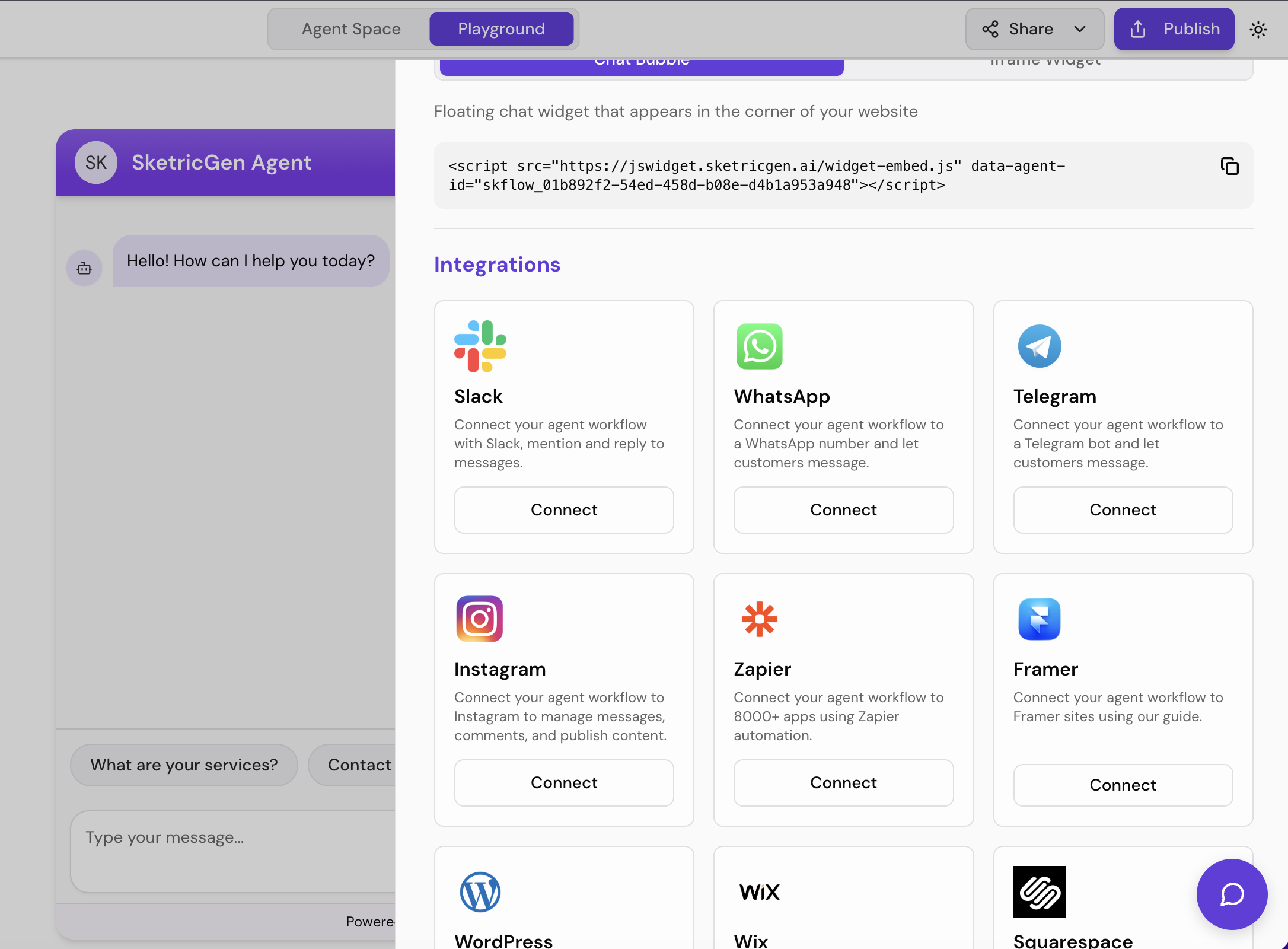
* Enabled **Instagram** and **Zapier** in the UI with updated plan limits and configuration handling
**Why it matters:** faster setup, clearer integration status, and better support for multi-channel agent operations.
***
### 2) Smoother scrolling and pagination (less jank, more speed)
We improved pagination behavior with updated limits and a clearer “has more conversations” handling to make infinite scrolling more reliable.
**Why it matters:** easier triage and monitoring when you have lots of threads—especially on mobile.
***
### 3) Richer messages (attachments foundation)
We updated the message schema to include an **assets field**, and standardized how Contact IDs propagate across supported messaging platforms.
**Why it matters:** this is the groundwork for richer message types (attachments/uploads) across channels and more consistent cross-platform behavior.
***
### 4) Public asset uploads (in development — not fully released yet)
We started building a **public asset upload system** (still in development, not fully enabled for end users yet), including:
* A dedicated public assets model with authorization rules
* A new upload service for more reliable file handling and error management
* Platform improvements to support agent-based asset retrieval
**Why it matters for users:** once completed, this enables smoother file/asset handling for agent experiences (e.g., uploading and referencing documents/media during workflows) with better reliability and security.
> Note: We’ll announce this as a user-facing feature when the UI and full workflow are ready.
***
### 5) Integration updates (Instagram UX + Zapier enabled)
* Improved Instagram integration UX with clearer feedback (e.g., notifications during actions)
* Added platform support needed for **human takeover** logic in multi-channel agents
* Enabled **Instagram** and **Zapier** in the UI with updated plan limits and configuration handling
**Why it matters:** faster setup, clearer integration status, and better support for multi-channel agent operations.
 ***
### 6) Authentication & UI improvements (small changes, big friction reduction)
* Added **sign-out** support
* Improved login redirects
* Clarified messaging for FileSearch badge
* General UI cleanup and consistency improvements
**Why it matters:** fewer confusing login loops and a cleaner experience across the app.
***
## Who this release is for
* Teams managing lots of customer conversations and needing **faster search + better filters**
* Multi-channel agent setups where consistency across platforms matters
* Anyone preparing to use richer message types (attachments/uploads)
* Builders connecting Instagram or Zapier and wanting a smoother setup experience
***
## How to use (quick steps)
### Find a conversation faster with Contact IDs
1. Open **Conversations**
2. Use search/filter to query by **Contact ID**
3. Apply platform filters for more accurate views
4. Disable a contact source if it’s noisy or irrelevant
### Enable Instagram or Zapier
1. Go to **Integrations**
2. Select **Instagram** or **Zapier**
3. Follow the connect flow and confirm the connection status
4. Run a test message/workflow to verify end-to-end behavior
### Prepare for attachments (assets field)
1. If your workflows depend on file/asset content, keep an eye on upcoming “public asset uploads”
2. For now, rely on your current asset/document handling flows
3. When released, you’ll be able to attach/upload more seamlessly across channels
***
## FAQ
**What is a Contact ID in SketricGen Conversations?**\
A stable identifier that helps you search, filter, and retrieve conversation threads more reliably—especially across multiple platforms.
**Can I disable a contact from showing up in Conversations?**\
Yes—you can disable/enable contacts as conversation sources to reduce noise.
**Are attachments supported now?**\
This release adds the schema foundation (“assets” field). User-facing attachment workflows will expand as the public asset upload system is completed and enabled.
**Is the public asset upload feature available today?**\
Not fully—it’s in development. The platform foundation is in place, and we’ll announce it when the UI and full workflow are ready.
**Are Instagram and Zapier available in the UI now?**\
Yes—both are enabled in the UI, with improved configuration handling and updated plan limits.
**What is “human takeover” support?**\
A capability needed for multi-channel agents to hand off a conversation to a human operator when appropriate (more improvements coming).
***
## Get Started
* **Try SketricGen:** [https://www.sketricgen.ai/](https://www.sketricgen.ai/)
* **Browse Templates:** [https://www.sketricgen.ai/template](https://www.sketricgen.ai/template)
* **Docs: Conversations & Insights:** [/user-guides/conversations-and-insights](/user-guides/conversations-and-insights)
* **Docs: Instagram Integration:** [/deploy/instagram](/deploy/instagram)
* **Docs: Zapier Integration:** [/deploy/zapier](/deploy/zapier)
***
### 6) Authentication & UI improvements (small changes, big friction reduction)
* Added **sign-out** support
* Improved login redirects
* Clarified messaging for FileSearch badge
* General UI cleanup and consistency improvements
**Why it matters:** fewer confusing login loops and a cleaner experience across the app.
***
## Who this release is for
* Teams managing lots of customer conversations and needing **faster search + better filters**
* Multi-channel agent setups where consistency across platforms matters
* Anyone preparing to use richer message types (attachments/uploads)
* Builders connecting Instagram or Zapier and wanting a smoother setup experience
***
## How to use (quick steps)
### Find a conversation faster with Contact IDs
1. Open **Conversations**
2. Use search/filter to query by **Contact ID**
3. Apply platform filters for more accurate views
4. Disable a contact source if it’s noisy or irrelevant
### Enable Instagram or Zapier
1. Go to **Integrations**
2. Select **Instagram** or **Zapier**
3. Follow the connect flow and confirm the connection status
4. Run a test message/workflow to verify end-to-end behavior
### Prepare for attachments (assets field)
1. If your workflows depend on file/asset content, keep an eye on upcoming “public asset uploads”
2. For now, rely on your current asset/document handling flows
3. When released, you’ll be able to attach/upload more seamlessly across channels
***
## FAQ
**What is a Contact ID in SketricGen Conversations?**\
A stable identifier that helps you search, filter, and retrieve conversation threads more reliably—especially across multiple platforms.
**Can I disable a contact from showing up in Conversations?**\
Yes—you can disable/enable contacts as conversation sources to reduce noise.
**Are attachments supported now?**\
This release adds the schema foundation (“assets” field). User-facing attachment workflows will expand as the public asset upload system is completed and enabled.
**Is the public asset upload feature available today?**\
Not fully—it’s in development. The platform foundation is in place, and we’ll announce it when the UI and full workflow are ready.
**Are Instagram and Zapier available in the UI now?**\
Yes—both are enabled in the UI, with improved configuration handling and updated plan limits.
**What is “human takeover” support?**\
A capability needed for multi-channel agents to hand off a conversation to a human operator when appropriate (more improvements coming).
***
## Get Started
* **Try SketricGen:** [https://www.sketricgen.ai/](https://www.sketricgen.ai/)
* **Browse Templates:** [https://www.sketricgen.ai/template](https://www.sketricgen.ai/template)
* **Docs: Conversations & Insights:** [/user-guides/conversations-and-insights](/user-guides/conversations-and-insights)
* **Docs: Instagram Integration:** [/deploy/instagram](/deploy/instagram)
* **Docs: Zapier Integration:** [/deploy/zapier](/deploy/zapier)